Not using Windows? You may need to extract ROM images manually. Check here.
Please purchase Mega Man Battle Network Legacy Collection from Steam, then download it.
Next, please download mmbn-srl-extractor from our GitHub repository:
You can choose either mmbn-srl-extractor_i686.exe or mmbn-srl-extractor_x86_64.exe. Once you have it downloaded, simply double click it.
It will not work without having game purchased and downloaded from Steam.
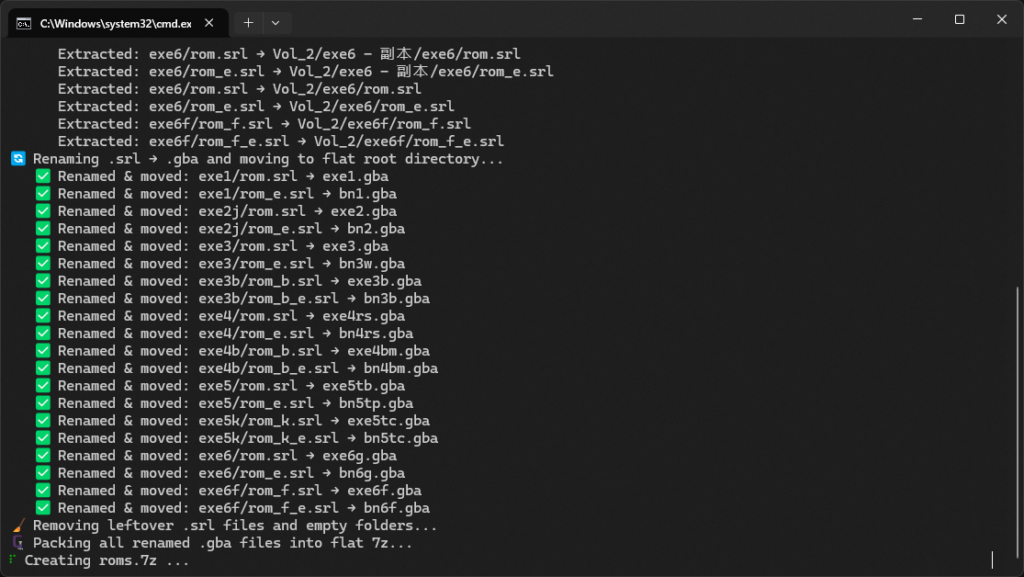
Give it few seconds, it will automatically generate an archive file named roms.7z at same location of this program for later use.
- exe1.gba -> Battle Network Rockman EXE 1 (Japanese)
- exe2.gba -> Battle Network Rockman EXE 2 (Japanese)
- exe3.gba -> Battle Network Rockman EXE 3 (Japanese)
- exe3b.gba -> Battle Network Rockman EXE 3: Black (Japanese)
- exe4rs.gba -> Rockman EXE 4: Tournament Red Sun (Japanese)
- exe4bm.gba -> Rockman EXE 4: Tournament Blue Moon (Japanese)
- exe5tb.gba -> Rockman EXE 5: Team of Blues (Japanese)
- exe5tc.gba -> Rockman EXE 5: Team of Colonel (Japanese)
- exe6f.gba -> Rockman EXE 6: Dennoujuu Faltzer (Japanese)
- exe6g.gba -> Rockman EXE 6: Dennoujuu Greiga (Japanese)
- bn1.gba -> Mega Man Battle Network 1 (US English)
- bn2.gba -> Mega Man Battle Network 2 (US English)
- bn3w.gba -> Mega Man Battle Network 3: White (US English)
- bn3b.gba -> Mega Man Battle Network 3: Blue (US English)
- bn4rs.gba -> Mega Man Battle Network 4: Red Sun (US English)
- bn4bm.gba -> Mega Man Battle Network 4: Blue Moon (US English)
- bn5tp.gba -> Mega Man Battle Network 5: Team Protoman (US English)
- bn5tc.gba -> Mega Man Battle Network 5: Team Colonel (US English)
- bn6f.gba -> Mega Man Battle Network 6: Cybeast Falzar (US English)
- bn6g.gba -> Mega Man Battle Network 6: Cybeast Gregar (US English)
Rockman EXE 4.5: Real Operation ROM is supported, but ROM image is not included in Battle Network Legacy Collection.